Showing posts with label C Control Statements. Show all posts

Continue Statement

Continue Statement in C

#C Continue statement are used to skips the rest of the current iteration in a loop and returns to the top of the loop. The continue statement works like a shortcut to the end of the loop body.

Use break statement

Syntax

jump-statements (loop or switch case);
continue; 

Example of continue

#include<stdio.h>
#include<conio.h>

void main()
{    
int i=1;  
clrscr();    
  
for(i=1; i<=10; i++) 
{    
if(i==3)  //if value of i is equal to 3, it will continue the loop 
{  
continue;  
}  
printf("%d \n",i);  
}//end of for loop  
  
getch();    
}

Output

1
2
4
5
6
7
8
9
10

Break Statement

Break Statement in C

#Break statement are used for terminates any type of loop e.g, while loop, do while loop or for loop. The break statement terminates the loop body immediately and passes control to the next statement after the loop. In case of inner loops, it terminates the control of inner loop only.

Use break statement

Break statement are mainly used with loop and switch statement. often use the break statement with the if statement.
  • with loop statement
  • with switch case
  • with if statement

Syntax

jump-statements (loop or switch case);
break;

Example of break

#include<stdio.h>
#include<conio.h>

void main()
{
char key;
 
printf("Press any key or E to exit:\n");
while(1)
{
scanf("%c", &key);
if (key == 'E' ||  key == 'e')
break;
}
printf("Good bye !\n");
}
Explanation:In the above code when user enter any character, if the user enters E or e, the break statement terminates the while loop and control is passed to the statement after the while loop that displays the Good bye !message.

Output

Press any key or E to exit
Good bye !

Do While Loop

do-while in C

#A do-while loop is similar to a while loop, except that a do-while loop is execute at least one time.
do while loop is a control flow statement that executes a block of code at least once, and then repeatedly executes the block, or not, depending on a given condition at the end of the block (in while).

Syntax

do
{
Statements;
........
Increment or Decrements (++ or --)
}
while(condition);

Flow Diagram


When use do..while loop

when we need to repeat the statement block at least one time then use do-while loop. In do-while loop post-checking process will be occur, that is after execution of the statement block condition part will be executed.
In below example you can see in this program i=20 and we check condition i is less than 10, that means condition is false but do..while loop execute once and print Hello world ! at one time.

Example of do..while loop

#include<stdio.h>
#include<conio.h>

void main()
{
int i=20;
do
{
printf("Hello world !");
i++;
}
while(i<10);
getch();
}

Output

Hello world !

Example of do..while loop

#include<stdio.h>
#include<conio.h>

void main()
{
int i;
clrscr();
i=1;
do
{
printf("\n%d",i);
i++;
}
while(i<5);
getch();
}

Output

1
2
3
4

For Loop in C

For Loop in C

#When you need to execute a block of code several number of times then you need to use looping concept in C language. In C Programming Language for loop is a statement which allows code to be repeatedly executed. It contains 3 parts.
  • Initialization
  • Condition
  • Increment or Decrements

Syntax

for ( initialization; condition; increment )
{
 statement(s);
}

  • Initialization: This step is execute first and this is execute only once when we are entering into the loop first time. This step is allow to declare and initialize any loop control variables.
  • Condition: This is next step after initialization step, if it is true, the body of the loop is executed, if it is false then the body of the loop does not execute and flow of control goes outside of the for loop.
  • Increment or Decrements: After completion of Initialization and Condition steps loop body code is executed and then Increment or Decrements steps is execute. This statement allows to update any loop control variables.
Note: In for loop everything is optional but mandatory to place 2 semicolons (; ;)

Example

for()     // Error
for( ; ; )  // valid

Flow Diagram


Control flow of for loop


  • First initialize the variable, It execute only once when we are entering into the loop first time.
  • In second step check condition
  • In third step control goes inside loop body and execute.
  • At last increase the value of variable
  • Same process is repeat until condition not false.

Example of for loop

#include<stdio.h>
#include<conio.h>

void main()
{
int i;
clrscr();
for(i=1;i<5;i++)
{
printf("\n%d",i);
}
getch();
}

Output

1
2
3
4

Important Points

  • In for loop if condition part is not given then it will repeats infinite times, because condition part will replace it non-zero. So it is always true like.
    for( ; 1; )
  • For loop is repeats in anti lock wise direction.
  • In for loop also rechecking process will be occurred that is before execution of the statement block, condition part will evaluated.

Example

while(0)  // no repetition
for( ; 0; )  // it will repeats 1 time
Note: Always execution process of for loop is faster than while loop.

While Loop

While Loop in C

#In while loop First check the condition if condition is true then control goes inside the loop body other wise goes outside the body. while loop will be repeats in clock wise direction.

Syntax

Assignment;
while(condition)
{
statements;
............
Increment or Decrements (++ or --);
}
Note: If while loop condition never false then loop become infinite loop.

When while loop is use ?

When we do not know about how many times loops are perform or iteration of loop is unknown.

Flow Diagram


Example of while Loop

#include<stdio.h>
#include<conio.h>

void main()
{
int i;
clrscr();
i=1;
while(i<5)
{
printf("\n%d",i);
i++;
}
getch();
}

Output

Output:
1
2
3
4
Execution process of while loop is slower than for loop.

Looping Statements

Looping statement

#Looping statement are the statements execute one or more statement repeatedly several number of times. In C programming language there are three types of loops; while, for and do-while.

Why use loop ?

When you need to execute a block of code several number of times then you need to use looping concept in C language.

Advantage with looping statement

  • Reduce length of Code
  • Take less memory space.
  • Burden on the developer is reducing.
  • Time consuming process to execute the program is reduced.

Types of Loops.

There are three type of Loops available in 'C' programming language.
  • while loop
  • for loop
  • do..while

Difference between conditional and looping statement

Conditional statement executes only once in the program where as looping statements executes repeatedly several number of time.

While loop

In while loop First check the condition if condition is true then control goes inside the loop body other wise goes outside the body. while loop will be repeats in clock wise direction.

Syntax

Assignment;
while(condition)
{
Statements;
......
Increment/decrements (++ or --);
}
Note: If while loop condition never false then loop become infinite loop.

Example of while loop

#include<stdio.h>
#include<conio.h>

void main()
{
int i;
clrscr();
i=1;
while(i<5)
{
printf("\n%d",i);
i++;
}
getch();
}

Output

1
2
3
4

For loop

for loop is a statement which allows code to be repeatedly executed. For loop contains 3 parts Initialization, Condition and Increment or Decrements.

Example of for loop

#include<stdio.h>
#include<conio.h>

void main()
{
int i;
clrscr();
for(i=1;i<5;i++)
{
printf("\n%d",i);
}
getch();
}

Output

1
2
3
4

do-while

do-while loop is similar to a while loop, except that a do-while loop is execute at least one time.
A do while loop is a control flow statement that executes a block of code at least once, and then repeatedly executes the block, or not, depending on a given condition at the end of the block (in while).

Syntax

do
{
Statements;
........
Increment/decrement (++ or --)
} while();

When use do..while Loop

When we need to repeat the statement block at least 1 time then we use do-while loop.

Example of do..while loop

#include<stdio.h>
#include<conio.h>

void main()
{
int i;
clrscr();
i=1;
do
{
printf("\n%d",i);
i++;
}
while(i<5);
getch();
}

Output

1
2
3
4

Nested loop

In Nested loop one loop is place within another loop body.
When we need to repeated loop body itself n number of times use nested loops. Nested loops can be design upto 255 blocks.

Switch Statement in C

Switch Statement

#The switch statement in C language is used to execute the code from multiple conditions or case. It is same like if else-if ladder statement.
A switch statement work with byte, short, char and int primitive data type, it also works with enumerated types and string.

Syntax

switch(expression or variable)
{
case  value:
//statements
// any number of case statements
break;  //optional
default: //optional
//statements
}

Flow chart
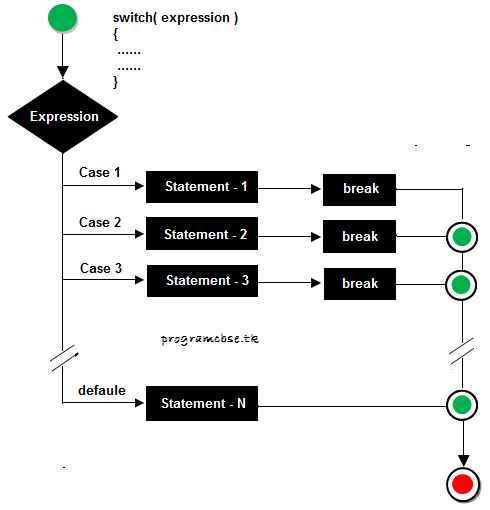

Rules for apply switch

  • The switch expression must be of integer or character type.
  • With switch statement use only byte, short, int, char data type.
  • With switch statement not use float data type.
  • You can use any number of case statements within a switch.
  • The case value can be used only inside the switch statement.
  • Value for a case must be same as the variable in switch.
Valid statement for switch

Example

int x;
byte y;
short z;
char a,b;

Limitations of switch

Logical operators can not be used with switch statement. For instance

Example

case k>20&&k=20: // is not allowed
Switch case variables can have only int and char data type. So float data type is not allowed.
case 4.2:  // Invalid 

Syntax

switch(ch) 
{ 
case 1:   
statement 1; 
break; 
case 2: 
statement 2; 
break; 
} 
In this ch can be integer or char and can not be float or any other data type.

Rulse table of switch

Valid SwitchInvalid SwitchValid CaseInvalid Case
switch(a)switch(2.3)case 3;case 2.5;
switch(a>b)switch(a+2.5)case 'a';case x;
switch(a+b-2)case 1+2;case x+2;
switch(func(a,b))case 'a'>'b';case 1,2,3;

Example of switch case

#include<stdio.h>
#include<conio.h>

void main()
{
int ch;
clrscr();
printf("Enter any number (1 to 7)");
scanf("%d",&ch);
switch(ch)
{
case  1:
printf("Today is Monday");
break;
case  2:
printf("Today is Tuesday");
break;
case  3:
printf("Today is Wednesday");
break;
case  4:
printf("Today is Thursday");
break;
case  5:
printf("Today is Friday");
break;
case  6:
printf("Today is Saturday");
break;
case  7:
printf("Today is Sunday");
break;
default:
printf("Only enter value 1 to 7");
}
getch();
}

Output

Enter any number (1 to 7): 5 Today is Friday
Note: In switch statement default is optional but when we use this in switch default is executed at last whenever all cases are not satisfied the condition.

Example of Switch without break

#include<stdio.h>
#include<conio.h>

void main()
{
int ch;
clrscr();
printf("Enter any number (1 to 7)");
scanf("%d",&ch);
switch(ch)
{
case  1:
printf("Today is Monday");
case  2:
printf("Today is Tuesday");
case  3:
printf("Today is Wednesday");
case  4:
printf("Today is Thursday");
case  5:
printf("Today is Friday");
case  6:
printf("Today is Saturday");
case  7:
printf("Today is Sunday");
default:
printf("Only enter value 1 to 7");
}
getch();
}

Output

Enter any number (1 to 7): 4 Today is Thursday Today is Friday Today is Saturday Today is Sunday
Note: In switch statement when you not use break keyword after any statement then all the case after matching case will be execute. In above code case 4 is match and after case 4 all case are execute from case-4 to case-7.

C Program for calculator

Example

#include<stdio.h>
#include<conio.h>

void main()
{
char choice;
int a,b,res=0;
clrscr();
printf("Enter first value: ");
scanf("%d",&a);
printf("\n Enter operator: ");
choice=getch();
printf("\n Enter second value: ");
scanf("%d",&b);

switch(choice)
{
case '+':
  res=a+b;
  printf("Sum: %d",res);
break;
case '-':
  res=a-b;
  printf("Difference: %d",res);
break;
case '*':
  res=a*b;
  printf("Product: %d",res);
break;
case '/':
  res=a/b;
  printf("Quotient: %d",res);
break;
default:
  printf("Enter Valid Operator!!");
}
getch();
}

Example

Enter First number: 6
Enter operator : +
Enter Second number: 10
Sum: 16
Explanation: In above code choice=getch(); is used for scan or get one value by using getch() function from keyboard, and store is choice.